Lesson 1: Getting Started with HTML5 and Web Page
Requirements:
A. Follow the step-by-step instructions for this lesson exercise. See Lecture 1 presentation.
B. Create a folder on your
desktop called Lesson1
C. Launch www.jmistal.com in Google Chrome
D. Save the web
page as an HTML document.
Name the document as Lesson1.html
E.
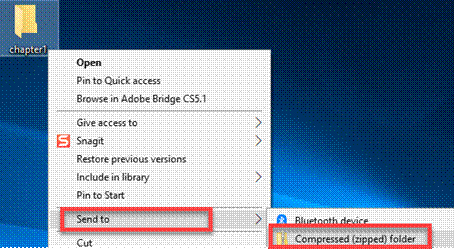
Zip up and submit the compress Lesson1 folder in the Canvas assignment
chapter 1 drop box.
NOTE: Right click on the folder and select “Send to “Compress Folder”. The file will
have a file extension of .zip
|
|
|
|
|
|
|
|
|
|
|
|
|
|
|
|
|
|
|
|
|