Lesson 2: Creating Your First HTML Page
Requirements:
A. Follow
the step-by-step instructions for this lesson exercise. See Lecture 2 presentation.
NOTE: You will use WordPad to create
your first HTML Page.
B. The text
content for your title and body can be your own creation but you will need
to add and apply the same markup language tags (HTML code &
syntax) illustrated in the lecture presentation in your HTML
document.
C. View your HTML document using your Browser. Attached is a sample output of the HTML source code.
D. Verify if the
HTML document- chapter2.html passes the W3C Markup Validation Service. You
will need to upload your HTML document to the site- http://validator.w3.org/.
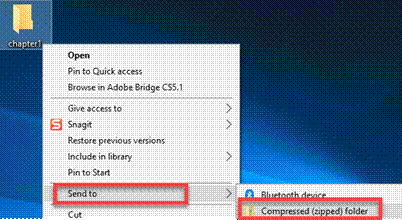
E. Zip up
and submit the compress Lesson2 folder in the Canvas assignment Lesson 2 drop
box.
NOTE: Right click on the folder and select “Send to “Compress Folder”. The file will have a file extension of .zip (see below)
|
Lecture 2 Topics |
Points |
|
1. Start an HTML Document (include <html>,
<head>, <title> and <body> tags) |
15 |
|
2. Save an HTML Document |
4 |
|
3. View an HTML Document |
3 |
|
4. Add a Document Declaration |
4 |
|
5. Add Metadata |
4 |
|
Total |
30 |